District Consumption chart
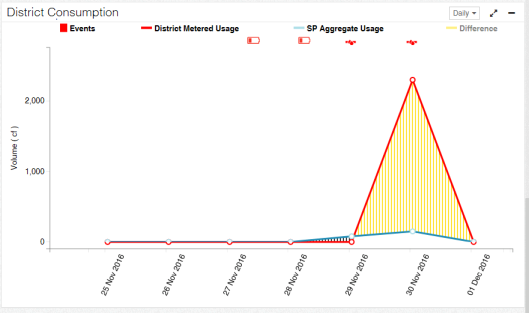
The District Consumption chart displays the events and usage for the selected district over time during the selected date range. This visualization can help you identify the cause or date of district loss.
For general information about charts, see User interface basics.
-
Panel Interval tool. Use this to change the interval of the data. Select one of the following:
-
Hourly. This interval is available only if the selected date range is set to 7 Days or less.
-
Daily
-
Weekly
-
Monthly
-
Quarterly
-
Yearly
-
-
Data layers. Click these to hide or show data on the chart. The Chart Filter tool will affect the layers available. For more information, see User interface basics.
-
Events. The analytic events reported by the service points in the district. This layer is enabled by default.
-
District Meter Usage. The sum of usage for all district meters associated with the district during the selected date range. This value is displayed in the unit chosen in the Set Units tool. Usage layers are enabled by default.
-
SP Aggregate Usage. The sum of usage for all service points associated with the district during the selected date range. This value is displayed in the unit chosen in the Set Units tool. Usage layers are enabled by default.
-
Difference. The difference between the district meter usage and the service point usage. The difference hatch is yellow if there is it is a positive value and black if it is a negative value. If this layer is showing, but District Meter Usage and SP Aggregate Usage are hidden, the layer shows as a line.
-
-
Left Y-axis. Volume. The total volume reported in the unit chosen in the Set Units tool.
-
X-axis. Date/Time. Dates and times over the selected date range. This is refined by the Panel Interval tool.
-
Chart data. Click these to hide or show data on the chart. The Chart Filter tool will affect the layers available. For more information, see User interface basics. The following symbols and modifications provide additional information about the chart data:
-
No Usage on Active (
 ). A No Usage on Active event occurs when an active service point had usage below a specified threshold for a specified number of days. The usage also must be a positive value.
 -
Tamper (
 ). Tamper analytic events are triggered by associated device events in the CEF file or OpenWay Collection Manager API. For example, a cut cable device event would trigger a Tamper analytic event.
 -
Usage on Inactive (
 ). A Usage on Inactive event occurs when an inactive service point had usage above a specified threshold for a specified number of days.
 -
Low Battery (
 ). A Low Battery event occurs when the meter's or device's battery is low and should be replaced.
 -
Meter Temperature (
 ). A Meter Temperature event occurs when a threshold on the meter indicates that the meter's temperature is too cold or hot to function.
-