File Processing table
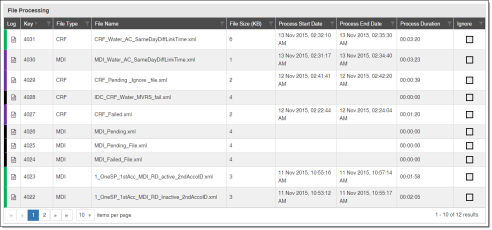
The File Processing table displays a list of the files that were imported during the selected date range. The table includes file names, process dates, durations, and other related information. The table displays a maximum of 1000 results, which can be sorted or filtered by each column. The results can also be filtered based on selections made in the File Information panel. For more information, see File Information panel.
-
File Status. The color on the left side of a row indicates the file's status by matching the colors in the File Information panel.
-
Red. Failed.
-
Gray. Pending.
-
Yellow. Partially valid.
-
Blue. Valid.
-
Purple. Partially processed.
-
Green. Processed.
-
Black. Ignored.
-
-
Log. Click this to open the Process Log table, which displays messages that occurred while processing the file. For more information, see Process Log table.
-
Key. The unique number that identifies the file's log entry.
-
File Type. The type of file. For example, MDI or CEF.
-
File Name. The name of the file.
-
File Size (KB). The size of the file in KB.
-
Process Start Date. The server's local date and time when the import process began.
-
Process End Date. The server's local date and time when the import process finished.
-
Process Duration. The duration of the import process.
-
Ignore. Click this to ignore a file during the import process. Only files with a Failed or Pending status can be Ignored.
-
Table data. Click data on the table to filter the File Quality table to display only the quality issues in the selected files.