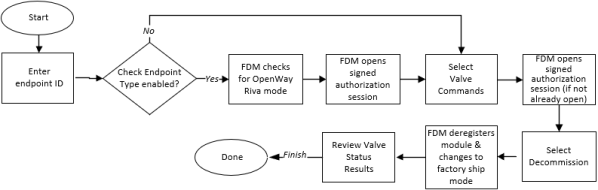
Valve Commands
Use Valve Commands to manage the Intelis Gas Meter, Gen5 Intelis Gas Meter, and OWR-GRD's shutoff valve. The shutoff valve provides the ability to remotely close the valve (disconnect service) and to send the command to open the valve (connect service), though an FSR must be on site to complete the connection process. The Intelis Gas Meter, Gen5 Intelis Gas Meter, and OWR-GRD each support the Valve Status, Connect, and Disconnect commands. The OWR-GRD supports two additional commands: Commission and Decommission.
The Intelis Gas Meter and Gen5 Intelis Gas Meter's valve operation is dependent on the meter's battery life and outside temperature conditions. If the meter measures its outside temperature outside operational temperature ranges for override conditions, or if its battery status is reported as Bad (charge at 10 percent or less), then FDM still attempts to complete the Connect or Disconnect command. If the valve won't operate–that is, if FDM rejects the initial command–then an second attempt can be made using the override for the command. For emergency cases only, the override is available for Connect and Disconnect commands. This allows you to attempt to use those commands even when minimum battery life and outside temperature conditions are not met.
Caution: Using the override command, valve operation is attempted but success is not guaranteed. Battery life could be too low or operating temperatures outside acceptable temperature ranges for the meter's valve to open or close, or for it to fully open or close. This means the valve could be left partially open if the override command fails. After you perform an override command, be it successful or unsuccessful, the meter must be replaced. For more information, see your Gen5 Intelis Gas Meter or Intelis Gas Meter's documentation.
The Intelis Gas Meter and Gen5 Intelis Gas Meter have a built-in high-flow alarm and temperature sensors. When the sensor detects a high flow or high temperature, indicating the possibility of an open fuel line or fire, the meter automatically performs a shutoff command. This closes the valve and generates an auto disconnect initiated alarm. When the valve is closed, the meter performs a volume check every 30 seconds. If the volume check detects more than 0.18 CF (5 L), then an alarm is logged in the event log. When operating in Network mode, the meter transmits the alarm to the meter data management (MDM) system.
Caution: The Intelis Gas Meter and Gen5 Intelis Gas Meter's shutoff valve is not intended as permanent shutoff mechanism. For permanent gas shutoff contact your utility for their designated procedures.
The OWR-GRD supports the ability to attach an external auto disconnect sensor. The auto disconnect sensor detects when the device is in the presence of water, indicating the possibility of a burst pipe or an extreme weather event. When the sensor detects water, the OWR-GRD automatically performs a shutoff command, closing the valve, and generates an Auto Disconnect Initiated alarm.
|
Caution: The FSR must be on site to ensure that conditions are safe for turning on the flow of gas. This is a three step procedure:
|
When you select the Valve Commands option, FDM displays the Valve Commands menu. The menu includes:
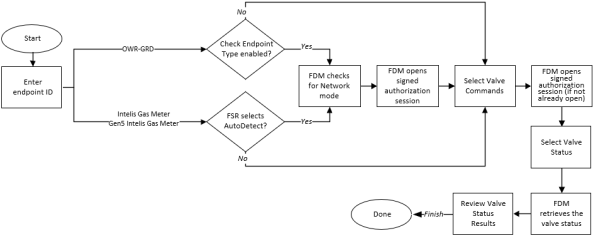
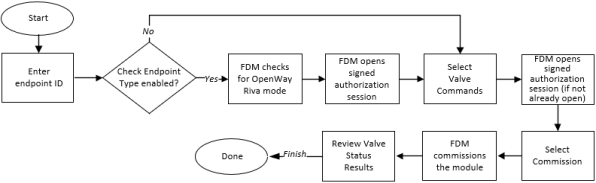
Valve Status:The Valve Status command retrieves and displays details about the status of the Intelis Gas Meter, Gen5 Intelis Gas Meter, or OWR-GRD's shutoff valve, including its current state (opened or closed), the last known control state, information about the last operation performed on the valve, and any active events related to the shutoff valve. For more information, see Intelis Gas Meter and Gen5 Intelis Gas Meter Valve Status Response Fields or for details about events, see Tampers and Events by Gas Endpoint. For the OWR-GRD, the Valve Status command also indicates whether or not an external auto detect sensor is connected. You must have Check Endpoints permission to perform this function. The following diagram summarizes the procedure:
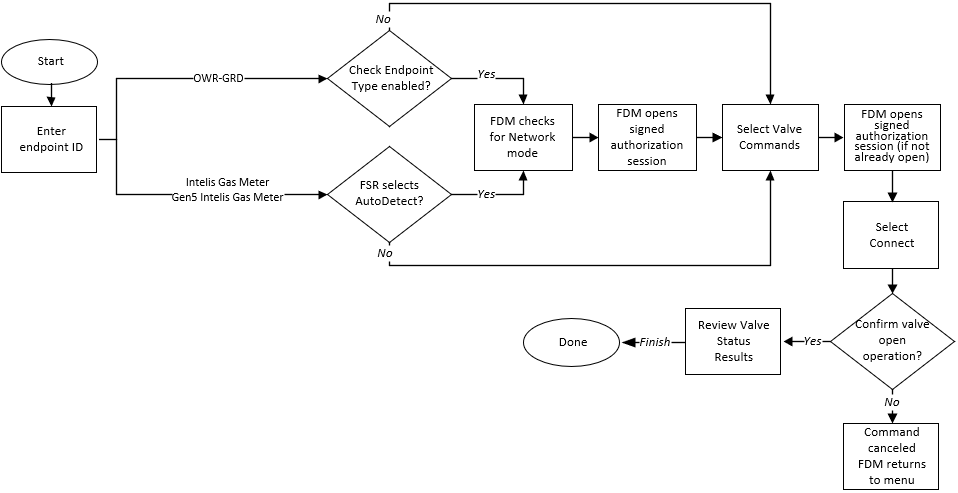
Connect: Use the Connect command to send the command to open (connect service) the device's shutoff valve. The Intelis Gas Meter, Gen5 Intelis Gas Meter, and OWR-GRD support the Connect command.
Important! Light equipment pilots lights only after the flow of gas is turned on.
Before you perform this command:
- Press the meter's hardware arm button after the workflow is complete.
- Ensure safe conditions before allowing the flow of gas.
- On the Intelis Gas Meter or Gen5 Intelis Gas Meter, verify there is not a gas flow downstream of the meter.
-
On the Intelis Gas Meter or Gen5 Intelis Gas Meter, check the meter's LCD screen to verify there are not alarms present. Resolve any active alarms before you perform the Connect.
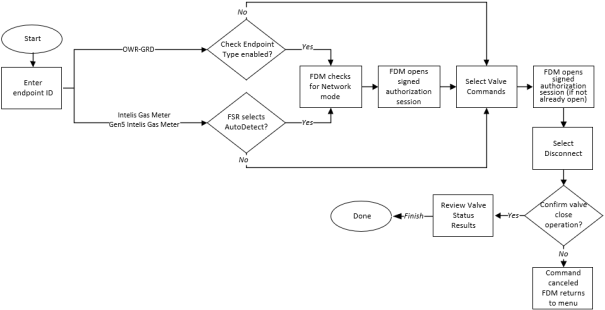
Disconnect: Use the Disconnect command to remotely halt the flow of gas, close the meter's valve, and disconnect service from the premises. You must have Disconnect permissions to perform this command.
Commission: The Commission command for the OWR-GRD enables the module by switching it out of factory mode, determines the module's vertical/horizontal orientation, and then displays its current service status. Commissioning an OWR-GRD does not change the valve's state, which is normally closed before commissioning. To connect service to the customer's premises you must use the Connect command after you commission the module.
Decommission: The Decommission command for the OWR-GRD switches the module into factory mode and then displays the module's current service status. Decommissioning an OWR-GRD does not change the valve's state. You cannot perform any FDM Tools function on a decommissioned OWR-GRD. To close the module's valve, you must use the Disconnect command before you decommission the module. You must have Disconnect permissions to perform this function.