Enhancements overview
The following sections summarize the noteworthy enhancements included in the IEE v10.1 release.
Extrapolation of intervals or registers
Several enhancements in IEE v10.1 have been introduced to allow utilities to extrapolate interval or register reads i.e. to estimate the interval or register reads forward beyond the last actual data received by the meter. This capability can be applied to a subset of customers for a duration of time.
For example, when the meter had stopped providing any reads and during a site visit, and the field engineer can see evidence of energy use from the premise but is unable to read the meter due to blocked access. In this scenario, the utility can turn on extrapolation to estimate reads forward beyond the last actual data from the meter and turn the extrapolation off when the meter communication returns. When actual reads arrive after missing interval & register reads have been extrapolated and already used in export with ADE or billing with ABE, the Stale Data Export (SDE) will re-process the new reads & sends unsolicited response to ADE or ABE.
This extrapolation capability can be turned on or off using the VE Set Override functionality that was introduced in IEE v10.0.
The enhancements that enable this capability are:
Alignment between register and interval estimation
Several enhancements in IEE v10.1 have been introduced to allow utilities to configure prioritization of interval estimation vs. register estimation, so that when Extrapolation of intervals or registers is turned on:
-
Register estimation will be based on historic estimation of interval reads, or
-
Interval estimation will be scaled to the estimated registers.
This approach ensures that register and interval reads are always aligned. This prioritization can be configured using the VE Set Override functionality that was introduced in IEE v10.0.
The enhancements that enable this capability are:
-
Enhancement to Register Gap Check for Non-ARI
-
Estimation Priority
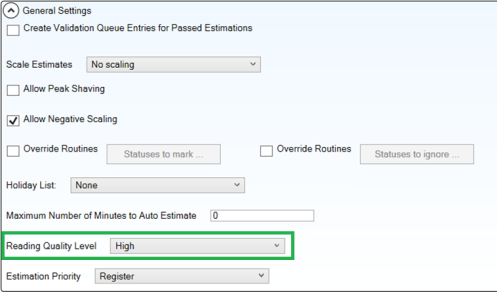
Reading quality level
Reading Quality Level is a new setting at the estimation set level that is used by several estimation routines. This setting determines the quality of the readings data used in estimation:
-
High: (default, existing behavior) estimations will be performed using actual readings data only, i.e., readings that do not have a MISSING or ESTNEEDED status. Note: Edited reads are considered actual reads.
-
Low: estimations will be performed using both actual and estimated readings data.
Setting the Reading Quality Level to Low allows you to estimate interval or register reads forward beyond the last actual data received by the meter, i.e., using estimated reads.
Enhancement to average recent load projection
The Average Recent Load Projection estimation routine estimates missing register reads using other register reads as reference. Prior to IEE v10.1, this estimation routine can only consider actual register reads as reference. This routine has been enhanced so that it now uses the Reading quality level parameter from the estimation set to determine whether to consider only actual register reads (if set to High which is the default), or to also consider estimated register reads (if set to Low).
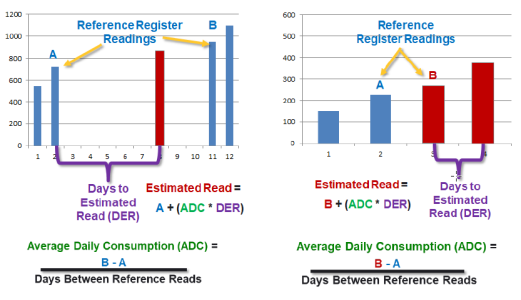
This estimation routine marks the estimated register reads with the ESTAVGLOADPROJ status. When Reading Quality Level is set to Low, the reads that were estimated using estimated reads are marked with ESTUSINGEST (Estimated using Estimates) status to indicate low quality.
Scaling using estimated registers
The scaling functionality has been enhanced to use the Reading quality level parameter from the estimation set to determine whether to consider only actual register reads (if set to High which is the default), or to also consider estimated register reads (if set to Low). When Reading Quality Level is set to Low, the reads that were scaled using estimated reads are marked with SES (Scaled using Estimates) status to indicate low quality. The specified behavior applies to both in line scaling and scaling with the SUE (Scale Unscaled Estimates) process.
Usage calculation (New register estimation routine)
Usage Calculation is a new register estimation routine. To estimate a register read, the routine calculates the sum of usage from interval reads & add the sum to the closest preceding register read. This routine is useful for utilities who collect interval data but rely on register reads for billing or for scenarios where register reads are missing.
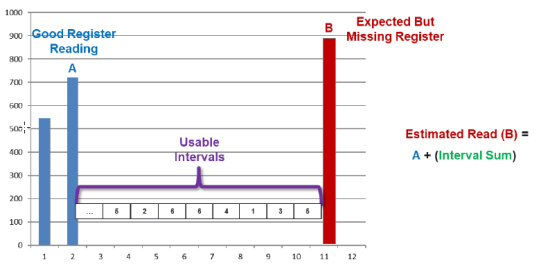
This routine uses the Reading quality level parameter from the estimation set to determine whether to consider only actual interval reads (if set to High which is the default), or to also consider estimated interval reads (if set to Low).
This estimation routine marks the estimated register reads with the ESTUSGCAL status. When Reading Quality Level is set to Low, the reads that were estimated using estimated reads are marked with ESTUSINGEST (Estimated using Estimates) status to indicate low quality.
Extended reading status
Reading status codes describe reading errors, estimation results, and other conditions. IEE typically assigns these reading status codes automatically. Reading statuses can also be added or updated manually using the Editing and Estimation tools.
The initial reading status design only supported 32,767 unique combinations in Microsoft SQL Server deployments and 99,999 unique combinations for Oracle deployments.
The IEE v10.1 enhancement increases the unique combinations to 65,535 and 999,999 for Microsoft SQL Server and Oracle deployments respectfully.
The IEE v10.1 database scripts will update the database column definition; there are no data migration scripts required.
Enhancement to register gap check for non-ARI
When the Register Gap Check validation rule was first introduced, the rule would fail register reads that have MISSING status, but the only reading importer that could create register reads with MISSING status was ARI. In IEE v10.1, this validation rule has been enhanced to support Non-ARI reading imports.
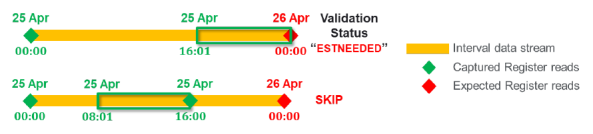
For Non-ARI, the Register Gap Check validation rule relies on linked channels. For example, when 8 hours chunk of data arrives, even if the reading container only contains interval reads, IEE will check if there is a linked register channel. If yes, it will check if Register Gap Check is enabled for that channel. It then uses the timespan from the reading container (e.g., 8 hours) and uses the Expected Time parameter to look for register read(s) that should exist in that time period, either in the reading payload or in the database.
Shown below are examples of in-line validation for SRI-E import of 8 hours chunk of data, when the Expected Time is set to 00:00 (midnight).
Estimation priority
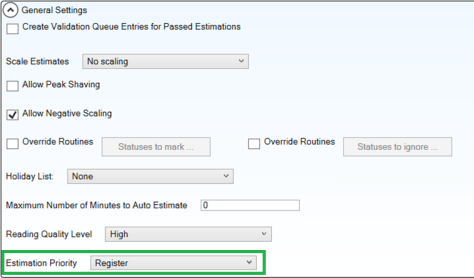
Estimation Priority is a new setting at the estimation set level. This setting determines the prioritization of interval vs register estimation:
-
Register: (default, existing behavior) when selected, the VE sequence of operations is as follows:
-
Register validation
-
Interval validation
-
Register estimation
-
Interval estimation
-
Scaling of interval data
-
-
Interval estimation will be scaled to the estimated registers.
-
Interval: when selected, the VE sequence of operations is as follows:
-
Register validation
-
Interval validation
-
Interval estimation
-
Scaling of interval data
-
Register estimation
-
-
Register estimation will be based on historic estimation of interval reads.
This approach ensures that when Extrapolation of intervals or registers is turned on, estimated register reads and estimated interval reads are always aligned.
ABE billing sum check
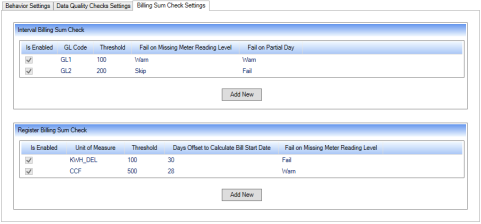
From IEE v10.1, AMI Billing Export (ABE) now supports billing sum check validation as part of its core functionality, for both interval-based billing and register-based billing. Previously, billing sum check validation was enabled and performed using custom billing validation stored procedures in ABE.
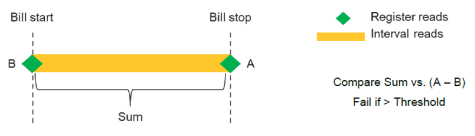
This check compares the sum of all intervals in the billing period with the difference between the start and end register reads. If the difference is bigger than the specified threshold, the check fails.
The ABE System Settings user interface has been modified to include Billing Sum Check settings for both interval-based and register-based billing sum checks.
Previous peak demand API
To support demand-based billing, typically a utility does a demand reset:
-
At the end of billing cycle, so that the demand register is reset and ready for the next billing cycle.
-
When a customer moves out, so that the demand register is reset and ready for the new customer who will move in.
When the billing request is received through ABE, IEE returns the demand register that is close to the billing stop date. However, there are scenarios where the utility has processed a customer move out request with a demand reset in the middle of the month or billing cycle, only to find later that they have made a mistake and processed the move out for the wrong customer or the wrong address. Even after they correct the mistake, the demand reset has been processed, so at the end of the billing cycle, the demand register that is closest to the end of billing cycle, is not the maximum demand for the period.
This new feature in IEE v10.1 allows the utility to make a billing request through ABE and specify the optional Peak parameter and the start & end date of the period. In this case, IEE will search for the maximum register value for the specified period, instead of simply returning whatever is the closest to the billing stop date (which is the current behavior). As part of this new feature, a utility will be able to do this either by making the billing request directly through ABE, or by making the request through SAP MDUS interface. The latter requires a BADI (SAP Business Add-In).
Single IEE driven configuration sync
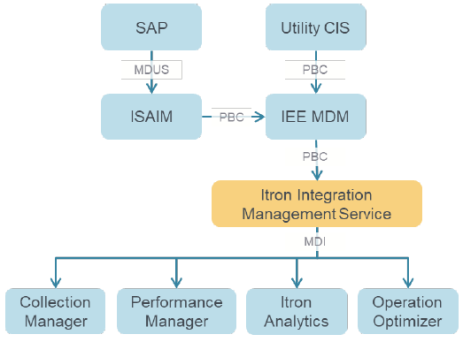
This enhancement leverages the Itron Integration Management Service. Configuration updates are coming from the Utility CIS to IEE through the Program Based Configuration API (PBC) or from SAP to IEE through the standard SAP MDUS interface (via ISAIM).
These configuration updates include new meter installations, meter swaps, meter removals, reprogramming, etc.
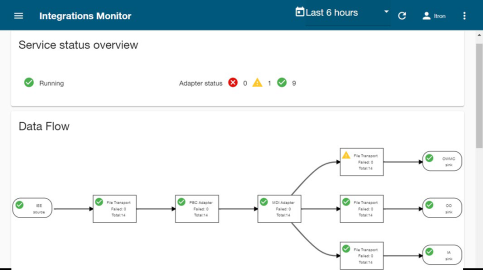
IEE forwards these configuration updates to Itron Integration Management Service (shown as the orange box in this diagram). The service translates the configuration updates (which in this case is from PBC format to MDI format) & triggers configuration sync in other applications.
This approach allows a single IEE driven configuration sync into other Itron applications that support MDI (Master Data Import format): such as Collection Manager, Performance Manager, Itron Analytics, and Operation Optimizer.
Itron Integration Management Service provides a monitoring UI that the operator can use to monitor the different messages & translations that go through this service.
IEE Settlements
The optional IEE Settlements module provides a complete and simple way to manage settlements data for a single ISO, multiple ISOs or even RTOs. The module ensures that the data provided to the ISO/RTO is consistent, conforms to utility business rules and is validated, tracked and versioned. IEE Settlements is fully integrated with IEE MDM’s database for managing critical settlement usage data used. Employing IEE MDM as the basis for settlement allows you to collect data from multiple head end systems. This eliminates manual consolidation work, import and reformatting of data, and other activities that can introduce errors into the settlement data set. The IEE Settlements module modernizes manual processes, reduces costs and process time to provide timely data to the ISO/RTO.
IEE MDM, coupled with the Settlements module, is the quickest, simplest way to update your settlement processes at a fraction of the cost of managing and maintaining separate settlement systems.
IEE Settlements is an optional package that imports, validates, and stores interval readings data collected from contributing data sources (i.e., meters, SCADA devices, etc.) The IEE Settlements package aggregates these readings from contributing Data Sources to Settlement Points (STPT) and Zones. IEE Settlements also includes new screens to monitor the overall Settlement Process and configure and view Settlement Points and Zones.
IEE Settlements has introduced three new entities:
-
Settlement Market represents an ISO or RTO. The Market is linked to Settlement Zones and Settlement Points. These links support aggregations at the Market and Zone levels.
-
Settlement Zone is a geographical area within the market’s territory. It is used to group and aggregate settlement points.
-
Settlement Point is the main point of data storage for the aggregated load values from contributing data sources that is submitted to the market.
The Program Based Configuration (PBC) screens and APIs have been enhanced to support the new Settlements entities.
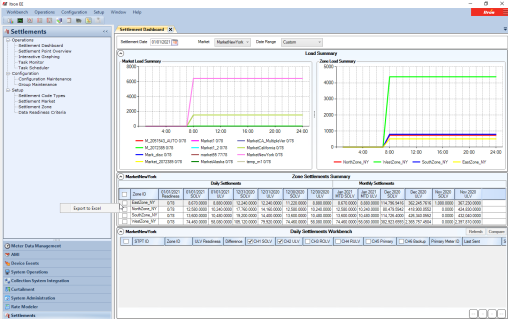
Our new Settlements Dashboard is the primary new user interface (screen shot below) to manage settlements submissions, downloading settlement point data from the ISO, etc. We also added additional user interfaces to inspect settlement points load values and settlement point configuration.
IEE v10.0 Service Pack enhancements
This section summarizes the enhancements introduced in IEE v10.0 service pack releases since IEE v10.0 was released in June 2020. In 2021, IEE team changed our development process such that all enhancements are done in the latest version first before they are ported to older releases of IEE. Therefore, these enhancements are integrated into the IEE v10.1 release. They are listed below in the order they were introduced in the IEE v10.0 service packs.
Revised behavior for honor final estimation
-
Introduced in IEE v10.0 HF01
-
Reference Number 2019226
Previously, even when the following setting: System Settings > Validation and Estimation > Estimation > Honor Final Estimation is set to True, actual readings can overwrite the final estimates. The behavior has now been revised, so that when Honor Final Estimation setting is set to True, reading with FINALESTIMATE status can only be overwritten by another reading with FINALESTIMATE status. There is no change when Honor Final Estimation setting is set to False.
A new interval validation rule has also been introduced: UsageDiffOnFinalEstimateCheck. This rule has its Route to Queue parameter enabled by default and cannot be disabled.
When Honor Final Estimation setting is set to True and the UsageDiffOnFinalEstimateCheck validation rule is not enabled,
-
A new read with any other status (actual, estimated, edited, PV, FV, or any other status) will not overwrite a reading with FINALESTIMATE status. The reading import task will log a warning, while the Editing UI will throw an error.
-
Reading with FINALESTIMATE status can be overwritten by another reading with FINALESTIMATE status.
When Honor Final Estimation setting is set to True and the UsageDiffOnFinalEstimateCheck validation rule is enabled,
-
A new read with any other status (actual, estimated, edited, PV, FV, or any other status) can overwrite a reading with FINALESTIMATE status. The reading status remains as FINALESTIMATE. If there is a usage difference, the reading will fail validation and it will be routed to the validation queue.
-
Reading with FINALESTIMATE status can be overwritten by another reading with FINALESTIMATE status. There will be no validation queue entry.
This behavior is consistent regardless of how the reading is imported, and whether the validation rule runs in-line with the import or manually triggered.
Temporary file extension for AMI Billing Export (ABE)
-
Introduced in IEE v10.0 HF01
-
Reference Number 2019629
After billing calculation has been completed, the AMI Billing Export (ABE) process writes the billing export XML file in the export folder. There was a short lag between the point when the XML file was first created, and the point when the process completed writing to the file, which made it possible for the external billing system to pick up an incomplete XML file prematurely.
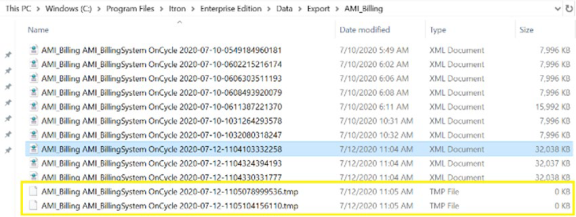
The ABE process has been enhanced. The process first creates the export file with a temporary file extension, and then renames the file with the correct extension when the writing process has been completed.
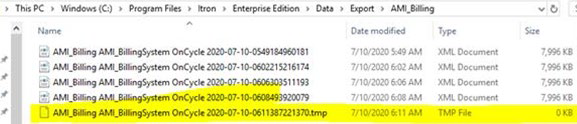
When there are multiple task runners, multiple files are created with the temporary file extension and are subsequently renamed upon completion.
Option to logically delete estimates during an interval length change
-
Introduced in IEE v10.0 HF01
-
Reference Number 2019649
The following system setting has been modified: System Settings > Configuration > Configuration > Purge Readings To Allow Interval Length Changes. It now has three options:
-
Off. This option is equivalent to the previous False.
-
Permanently delete. This option is equivalent to the previous True.
-
Logical delete. This is the new option that has been introduced to comply to regulatory or auditing purposes.
When a meter swap or meter programming that involves an interval length change is performed as part of a configuration update, and there are existing estimated reads in the service point channel(s),
-
If the setting is set to Off, the configuration update will fail and throw an error.
-
If the setting is set to Permanently delete, the process will purge the estimated reads and the configuration update will be successful.
-
If the setting is set to Logical delete, the process will keep the estimated reads in the database but mark them as deleted. The configuration update will be successful. The reads will no longer be visible from any UI screens.
This behavior is consistent whether the configuration update is performed through the API or the UI. It is only applicable when the existing data is estimated. if the existing data is actual or edited, the configuration update will still fail and require manual resolution.
Enhance program-based configuration API to inherit service point/meter time zone
-
Introduced in IEE v10.0 HF01
-
Reference Number 2020018
In the Program Based Configuration (PBC) import, a date/time (e.g. effective start/end date, install date) can be specified in 3 formats.
-
In UTC: yyyy-mm-ddThh:mm:ssZ (e.g. 2020-04-01T05:00:00Z)
-
With time zone offset: yyyy-mm-ddThh:mm:ss+/-hh:mm (e.g. 2020-04-01T05:00:00-05:00)
-
With no time zone offset: yyyy-mm-ddThh:mm:ss
A new system setting has been introduced: System Settings > Configuration > Configuration > Override PBC Import Date Time. The setting can either be False (Default) or True.
-
When a date/time is specified with no time zone offset and the setting is set to False, PBC treats the date/time as UTC. This is equivalent to the existing behavior.
-
When a date/time is specified with no time zone offset and the setting is set to True, PBC treats the date/time as the parent Service Point or Meter entity's time zone. However, if the parent Service Point or Meter entity's time zone is not specified, the date/time is treated as UTC.
This enhancement is applicable to date/times under a parent Service Point or Meter entity, including date/times under the Service Point's Linked Meter or Linked Account. It is not applicable to date/times under a parent Account entity.
This enhancement is applicable to the PBC API, both web service and file import. It is not applicable to Advanced Configuration.
Best interval UCE function
-
Introduced in IEE v10.0 HF03
-
Reference Number 1924995
The @BestInterval UCE function creates an interval stream from contributing channels based on priority and quality of the contributing intervals. When calculating the best interval, @BestInterval searches for the first high-quality interval from each of the contributors’ interval statuses. Once found, @BestInterval searches for the next high-quality interval, etc., etc. If unable to find a high-quality interval, the default status list will be applied.
For example, the following table shows the Best Intervals based on the contributors and interval quality. The parameters, along with explanation of the logic, are described below the table.
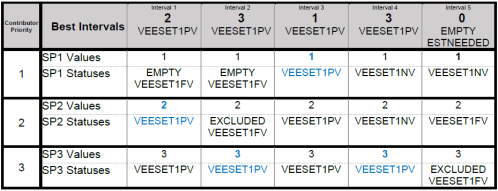
The @BestInterval parameters are described below:
@BestInterval(BestIntervalExcludeStatuses, BestIntervalMarkStatuses, <spc ref1>, <spc ref2>, …
<spc refN> / <default status list>)
-
BestIntervalExcludeStatuses: This parameter is a User Defined Attribute (UDA) ID, defined at the Service Point Channel (SPC) level for each contributor referenced in the Contributor Channel References parameter. The UDA is a list of interval statuses that are considered low quality (i.e. these statuses will eliminate a contributor’s interval).
-
For example: "EMPTY,EXCLUDED,VEESET1FV"
-
Note: This UDA does not need to be defined as a Searchable UDA.
-
Note: By default, VEESET1NV is used when exclude statuses are not specified.
-
-
BestIntervalMarkStatuses: This parameter is a User Defined Attribute (UDA) ID, defined at the Service Point Channel (SPC) level for each contributor referenced in the Contributor Channel References parameter. The UDA is a list of interval statuses that are added to the Best Interval to identify which contributor was selected.
-
For example, “PRIMARY,BACKUP1,BACKUP2”
-
Note: This UDA does not need to be defined as a Searchable UDA.
-
Note: You may need to create extended statuses.
-
-
Contributor Channel References: This is a list of channel references for each contributing service point.
-
For example:
<spc ref1>, <spc ref2>, … <spc refN>
-
-
Default Status List: This optional parameter is a list of interval statuses that will be used when no contributing intervals can be found.
-
For example: “EMPTY,ESTNEEDED”
-
Note: A “\” (backslash) delimiter is required between the last channel reference and the default status list.
-
The steps below explain the logic:
-
Interval 1
-
SP1, interval 1 has EMPTY status, so it skips this contributor
-
SP2, interval 1 has high-quality, so its value and statuses are used.
-
-
Interval 2
-
SP1, interval 2 has EMPTY status, so it skips this contributor
-
SP2, interval 2 has EXCLUDED status, so it skips this contributor
-
SP3, interval 2 has high-quality, so its value and statuses are used.
-
-
Interval 3
-
SP1, interval 3 has high-quality, so its value and statuses are used.
-
-
Interval 4
-
SP1, interval 4 has VEESET1NV status, so it skips this contributor
-
SP2, interval 4 has VEESET1NV status, so it skips this contributor
-
SP3, interval 4 has high-quality, so its value and statuses are used.
-
-
Interval 5
-
SP1, interval 5 has VEESET1NV status, so it skips this contributor
-
SP2, interval 5 has VEESET1FV status, so it skips this contributor
-
SP3, interval 5 has EXCLUDED status, so skips this contributor.
-
Since all contributors were skipped, the default status list is used.
-
Below are examples of the @BestInterval UCE function:
-
@bestinterval(uda1, uda2, $sp:11)
-
@bestinterval(uda1, uda2, $sp:11 \ MISSING, ESTNEEDED)
-
@bestinterval(uda1, uda2, 00008:11)
-
@bestinterval(uda1, uda2, 00008:11 \ MISSING, ESTNEEDED)
-
@bestinterval(uda1, uda2, $sp:11, $sp:12, $sp:13)
-
@bestinterval(uda1, uda2, $sp:11, $sp:12, $sp:13 \ MISSING, ESTNEEDED)
-
@bestinterval(uda1, uda2, 00008:11, 00008:12, 00008:13)
-
@bestinterval(uda1, uda2, 00008:11, 00008:12, 00008:13 \ MISSING, ESTNEEDED)
Enhancements to multi-week average and two-week like day historical routines
-
Introduced in IEE v10.0 HF03
-
Reference Number 2089919
The following interval estimation routines have been enhanced. Both estimation routines use historical data to estimate interval reads.
-
Multi-Week Average
-
Two-Week Like Day Historical
Following a meter swap or meter programming that involves an interval length change to a 5-minute interval length, these estimation routines consider larger to 5-minute interval length changes when calculating the interval estimate. All larger interval lengths are supported. For example:
-
A historical interval with 15-minute interval length is split into three to produce a 5-minute interval estimate.
-
A historical interval with 30-minute interval length is split into six to produce a 5-minute interval estimate.
The estimation routines also check the following system setting: System Settings > Validation and Estimation > Estimation > Alternate Statuses to Mark for Estimation. When the interval length change scenarios above are met and the system setting is not empty, the statuses specified in this new system setting will be used instead of the default Statuses to Mark. In other scenarios, the default Statuses to Mark will be used.