Creating request documents
The request document that your program creates must use one of the following operations:
-
RunTask. Use the RunTask operation to run the task immediately and to receive task output in the results document. This method is useful for infrequent tasks, but overuse of this method can slow down your Web server.
-
ScheduleTask. Use the ScheduleTask operation to create a task that will be run by the next available task runner. This method is best for handling multiple tasks.
The RunTask and ScheduleTask methods use a loosely typed web service model. The following sample shows the structure of a typical SOAP request. A CDATA section is required because the web service takes a string as an argument. The contents of the document are encapsulated in a CDATA section, which enables them to be interpreted as character data. The string that is passed in would normally be the exact contents of the TaskAPI XML file in the file‑based importer.
<soapenv:Envelope xmlns:soap="http://schemas.xmlsoap.org/soap/envelope/" xmlns:soapenv="http://schemas.xmlsoap.org/soap/envelope/" xmlns:web="http://itron.com/webservices/" xmlns:wsa="http://schemas.xmlsoap.org/ws/2004/03/addressing" xmlns:wsse="http://docs.oasis-open.org/wss/2004/01/oasis-200401-wss-wssecurity-secext-1.0.xsd" xmlns:wsu="http://docs.oasis-open.org/wss/2004/01/oasis-200401-wss-wssecurity-utility-1.0.xsd" xmlns:xsd="http://www.w3.org/2001/XMLSchema" xmlns:xsi="http://www.w3.org/2001/XMLSchema-instance">
<soapenv:Header>
<wsse:Security soap:mustUnderstand="1">
<wsse:UsernameToken wsu:Id="UsernameToken-8">
<wsse:Username>xxxxxxx</wsse:Username>
<wsse:Password Type="http://docs.oasis-open.org/wss/2004/01/oasis-200401-wss-username-token-profile-1.0#PasswordText">yyyyyyy</wsse:Password>
<wsse:Nonce EncodingType="http://docs.oasis-open.org/wss/2004/01/oasis-200401-wss-soap-message-security-1.0#Base64Binary">mgSvRic12tNQzH4mBaNtig==</wsse:Nonce>
<wsu:Created>2009-11-09T05:03:17.410Z</wsu:Created>
</wsse:UsernameToken>
</wsse:Security>
</soapenv:Header>
<soapenv:Body>
<web:RunTask xmlns="http://itron.com/webservices/">
<web:xmlRequestDocument><![CDATA<?xml version="1.0" encoding="utf-8"?>
<Task xmlns:xsd="http://www.w3.org/2001/XMLSchema" xmlns:xsi="http://www.w3.org/2001/XMLSchema-instance">
<RunTask Template="DefaultReadingXmlExportApi" ReturnType="String">
<Parameters>
<Parameter Name="StartDate" Value="2001-01-31T23:15:00Z" Index="0" />
<Parameter Name="EndDate" Value="2001-02-01T03:15:00Z" Index="0" />
<Parameter Name="NodeType" Value="ServicePoint" Index="0" />
<Parameter Name="EntityID" Value="02494" Index="0" />
<Parameter Name="NumberOfDecimals" Value="2" Index="0" />
<Parameter Name="TimeZoneID" Value="EasternUS" Index="0" />
<Parameter Name="ExternalSystemID" Value="MV90" Index="0" />
</Parameters>
</RunTask>
</Task>]]></web:xmlRequestDocument>
</web:RunTask>
</soapenv:Body>
</soapenv:Envelope>
The following sample is a more graphical representation of how the XML payload is embedded into the CDATA structure:
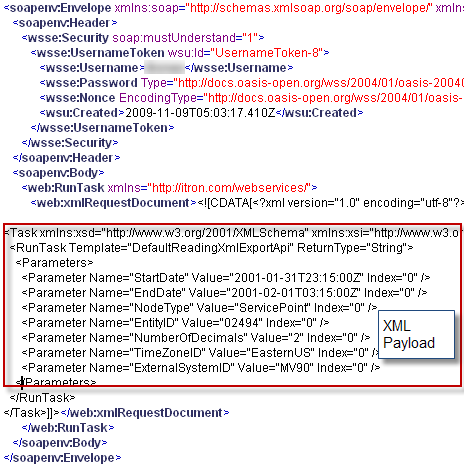
The following samples illustrate only the XML payload:
In a file‑based import, the payload would be the contents of the XML file that is dropped into the import directory to schedule or run the task. In a web service call, the payload would be the contents of the CDATA section of the SOAP message.