Removing a user's access
Only a System Administrator can remove a user's access. If a user ID has a status of remove access, the user ID is in a permanent disabled state. However, unlike deleting the user ID, the user ID remains in the system. This setting differentiates the user ID that is temporarily disabled from the user ID that is permanently removed from access to IEE.
A user ID can be temporarily disabled after three failed login attempts, but the user ID with removed access is no longer an IEE user.
A user ID that has data remaining in an Audit Log cannot be deleted, but you can permanently remove their access.
Caution: Remove Access is an irreversible status.
-
Go to System Administration > System Admin > Security Setup > Security User.
-
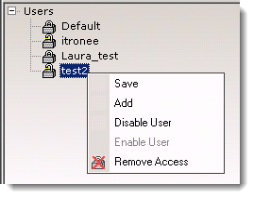
From the Users tab, click the name of the user to remove.
-
Select Remove Access from the right-click menu, from the Security menu or click the
 remove access toolbar icon.
A Warning dialog appears.
-
Click OK to remove access for the user or Cancel to exit without removing access.