Meter version schema
The Meter instance MeterVersion element holds the temporal properties of the meter. You can specify CT, PT, and multiplier values in the MeterVersion element as well as in the MeterInstallation element. This configuration eliminates the need to define a meter installation program and enables deprecation of the meter installation program.
The following illustration shows the MeterVersion element schema:
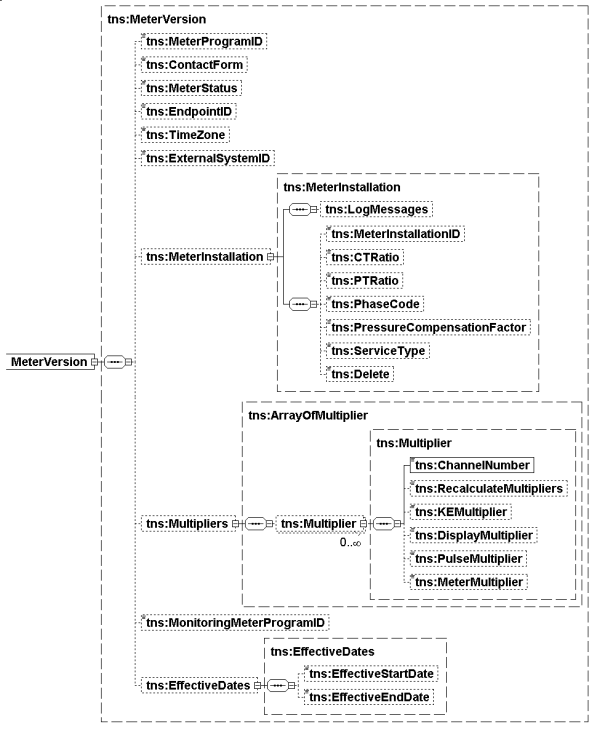
The following is a list of the MeterVersion schema elements. The elements that are required are indicated.
-
MeterProgramID. The ID of the MeterProgram. Must match an existing MeterProgram. The program holds all the attributes which are common to many meters.
-
ContactForm. Information about the base wiring of the Meter. The valid values are as follows: A = Two Wire, C = Three Wire
-
MeterStatus. The status of the meter. Meter Statuses are a predefined pair made up of a Status name and a predefined State. The predefined States are Active and Inactive. You can define statuses at the site, but they must always contain at least Commisioned (State = Active) and Decommisioned (State = Inactive). Other delivered Meter status are:
-
Active (State = Active)
-
Inactive (State = Inactive)
-
InStock (State = Inactive)
-
Sleeved (State = Inactive)
-
Disconnected (State = Inactive)
-
Armed (State = Inactive)
-
Provisioned (State = Active)
-
Commissioned (State = Active)
-
-
EndpointID. Collection System identifier of the meter, either the ExternalRecorderID if the meter program has an associated recorder, or a field in the meter itself if no associated recorder, often the ERT SN (serial number). Imported readings can include imported readings and then used by IEE to determine the meter they came from. ERT SNs might not always be unique, but the import will include a Market Type and an IsRegister flag to distinguish uniqueness. For Fixed Networks, a single meter may report up to three different ERT SNs.
-
TimeZone. The time zone of the meter that matches an existing Time Zone's reference ID configured in IEE.
-
ExternalSystemID. The meter's External System ID that matches an existing External System ID configured in IEE.
-
MeterInstallation. MeterInstallation of the meter. Only the ID of the MeterInstallation element is used and it must match an existing one. Meter Installation represents qualities associated with the meter base and therefore independent of the meter itself. Exports include the full contract. Imports require an existing MeterInstallation ID. On import, if the properties of the MeterInstallation contract don't match the database, the import will fail.
-
Multipliers. A collection of per-channel structures defining the factors that determine the correct evaluation of reading values.
-
MonitoringMeterProgramID. Identifies the MonitoringMeterProgram (also called the Monitoring Data program).
-
Effective Dates. (Optional) Effective dates for this version of temporal data. If this element isn't included, the data is assumed always effective.
-
EffectiveStartDate. The date that the relationship between the service point and a specific program started.
-
EffectiveEndDate. The date that the relationship between the service point and a specific program ended.