Events table
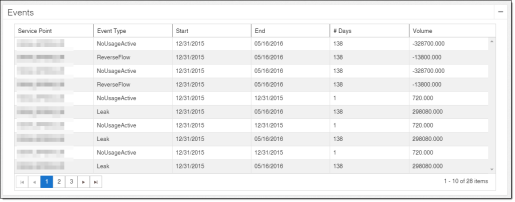
The Events table displays a list of the events that occurred on service points in the district during the selected date range. The table includes event types, times, and other related information. The table results can be sorted by each column.
-
Service Point. The unique identification number for a location that receives utility service. The service point ID is a link. Click the link to view detailed information about the service point on the Service Point Detail page.
-
Event Type. The type of event. These events are defined by thresholds set in the Admin Portal. For more information, see "Analytic Events" in the Itron Analytics Admin Portal Online Help.
-
No Usage on Active. An active service point had usage below a specified threshold for a specified number of days. The usage also must be a positive value.
-
Usage on Inactive. An inactive service point had usage above a specified threshold for a specified number of days.
-
Tamper. A service point had a Tamper analytic event. Tamper analytic events are triggered by associated device events in the CEF file or OpenWay Collection Manager API. For example, a cut cable device event would trigger a Tamper analytic event.
-
Meter Temperature. A service point had a Meter Temperature analytic event. A Meter Temperature event occurs when a threshold on the meter indicates that the meter's temperature is too cold or hot to function.
-
Low Battery.The meter's or device's battery is low and should be replaced.
-
-
Start. The date and time the event began.
-
End. The date and time the event ended.
-
# Days. The number of days the event was active.
-
Volume. The volume associated with the event. This value is displayed in the unit chosen in the Set Units tool.
-
No Usage on Active. An active service point had usage below a specified threshold for a specified number of days. The volume reported for this event is: (total consumption during first day of event) + (total consumption during second day of event)... + (total consumption during last day of event)
-
Usage on Inactive. An inactive service point had usage above a specified threshold for a specified number of days. The volume reported for this event is: (total consumption during first day of event) + (total consumption during second day of event)... + (total consumption during last day of event)
-
Tamper. A service point had a cut cable. The volume reported for this event is: (total consumption during first day of event) + (total consumption during second day of event)... + (total consumption during last day of event)
-