Accessing the Itron Analytics Admin Portal
-
Open a supported web browser. Supported web browsers include:
- Microsoft Internet Explorer v11.0 (or later)
- Google Chrome v43.0 (or later)
- Mozilla Firefox v39.0 (or later)
-
Ensure your Java plugin is updated.
-
Pop ups must be enabled on Itron Analytics websites.
Tip: Slow connection speeds impact performance.
-
Navigate to the Itron Analytics Analytics Portal at the link provided by Itron and sign in.
Tip: If you are having trouble logging into this URL, contact Itron Technical Support Services at support@itron.com or 1-877-487-6602.
Troubleshooting: An E_No_User error indicates that your username was set up with an incorrect User Principal Name (UPN). A tenant administrator must correct it. For more information about sign-in errors, see Common Validation Errors in the Tenant Management Online Help.
-
From the Itron Analytics home dashboard, click Admin Portal.
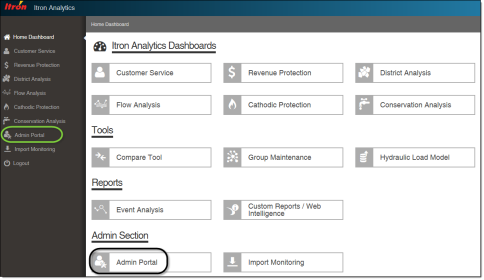
Note: Administrative permissions are required to open the Admin Portal. If you do not have administrative permissions, the Admin Portal link is not available.