Linking a group using utility-hosted Azure Active Directory
This functionality is only available to users with Tenant Admin permissions in the Itron Cloud Services Platform.
-
On the User Security page, click Create.
-
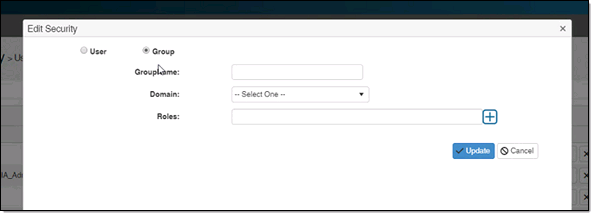
Verify that Group is selected.
-
Type the group name in Group Name. Do not include the domain name.
Important! This must be typed as an exact match to avoid creating a duplicate or E_No_User errors when signing in. A common mistake is entering a user's full email address (for example, joe.smith@itron.com) when the expected value is the User Principal Name (UPN) format (for example, jsmith). For more information about sign-in errors, see Common Validation Errors in the Tenant Management Online Help.
Important! The users in the group must be added individually in Itron Identity prior to being added in Itron Analytics.
-
Select itroncloudus.onmicrosoft.com from the Domain dropdown menu.
-
Select the appropriate roles for the user from the Roles menu. More than one role can be selected.
Tip: When a user has multiple roles with access to an app, all roles must have the denied function to block access to the function.
-
Click Update.