User interface overview
-
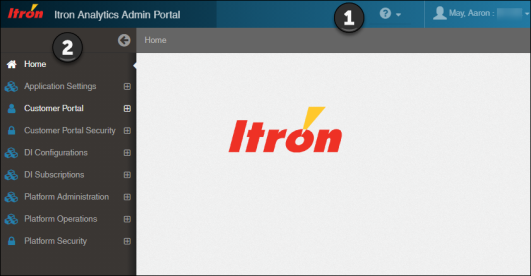
Header. This is persistent across all dashboards and pages.
-
Help. Click this to view the Itron Analytics Admin Portal Help.
-
(Deployments on itrontotal.com only) Switch Tenants and Sign Out. Click this to switch among available tenants (production, test, etc.) or sign out of Itron Analytics.
-
-
Navigation pane. The navigation pane contains links to the dashboards, tools, and reports available to you. These links go to the default versions of those pages. Your utility's licensing affects the items you see. Available menus include:
-
Application Settings. This menu contains pages you use to configure settings for specific commodities and external applications. For more information, see Application Settings.
-
Customer Portal. This menu contains pages you use to configure the behavior, presentation, and alerts of the Customer Portal. For more information, see Customer Portal.
-
Customer Portal Security. This menu contains pages you use to configure the security of the Customer Portal. For more information, see Customer Portal Security.
-
DI Configurations. This menu contains pages Itron personnel use to send Distributed Intelligence agent configuration change requests (CCRs) to utility personnel for review and deployment to Distributed Intelligence groups or individual endpoints. This menu is only available if your Itron Analytics deployment has Distributed Intelligence. For more information, see DI Configurations.
-
DI Subscriptions. This menu contains pages you use to manage DSS feature permissions and subscriptions, and to view DSS feature metrics. This menu is only available if your Itron Analytics deployment has Distributed Intelligence. For more information, see DI Subscriptions.
-
Platform Administration. This menu contains pages you use to configure the import, processing, and display of data in Itron Analytics. For more information, seePlatform Administration.
-
Platform Operations. This menu contains pages you use to control the import of data in Itron Analytics. For more information, see Platform Operations.
-
Platform Security. This menu contains pages you use to define the users and groups that can access Itron Analytics. The Platform Security menu can only be accessed by a security administrator. For more information, see Platform Security.
-