Managing HID events
-
Obtain meter list that contains the meter number, ServicePoint ID, address, latitude, and longitude for all sites that have the HidTheftAgent.
-
Review the HID events in the user interface.
-
Select registered HID events to investigate and add them to the system of record.
-
Prioritize events that have higher electrical resistance as measured in mOhms (greater than 200 mOhms).
Sites with seven or more days of HID events are a priority. Monitor sites with less than seven days.
-
Map HID events to reference the service area (Google Earth preferably - .kmz file).
-
Determine if the site has singlephase service (1S, 2S, 12S) meters or polyphase service (16S, 9S meters) and update the system of record if needed.
-
Determine if the site has an underground (service lateral) or overhead (service drop) feed from the transformer and update system of record if needed.
-
Check for any open service records for each event.
-
If there are any open or recently closed tickets that may be the reason for high impedance, update the system of record and continue to monitor.
-
Initiate a field investigation for sites that do not have any open tickets.
-
Schedule field investigations for the appropriate field operations group. Itron recommends a crew that can change service drops (line crew).
-
Pre-flights can also be scheduled to perform a visual inspection only. However, this could involve another truck roll later to resolve the issue.
-
-
A weekly review is recommended to review findings. During this meeting, each investigation is reviewed, categorized and the system of record is updated and closed
-
Review the impedance for the site to ensure that there are no more high impedance events. If there are still high impedance events, an additional site visit may be required.
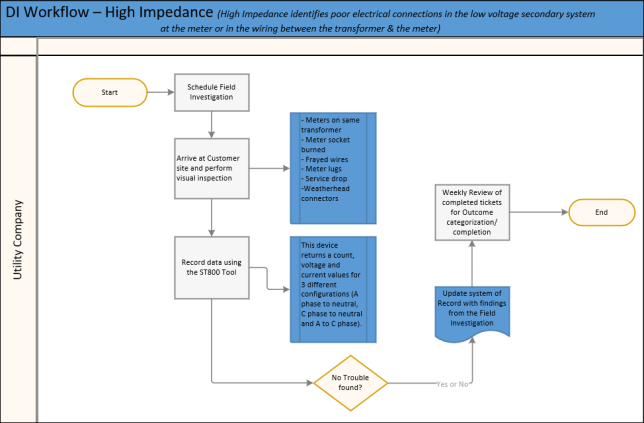
Managing HID events flowchart
The following flowchart illustrates the previous procedure.
Itron recommendations for field investigation personnel proficiencies
Field investigation personnel must be proficient in the following:
-
Removing meters from the meter socket.
-
Using a bucket truck to check and replace connectors located at the weather head or transformer.
-
Replacing an overhead service drop and drop wire from the transformer to the weather head.
-
Changing load side and line side wires coming into the meter socket.
-
Replacing meter clips and meter lugs inside a meter socket.
-
Using the ST800 service tester and phase identifier to measure the amperage within the meter socket.
Field investigation
-
Document whether the premise is overhead or underground fed (OH for service drop or service lateral for UG)
-
Perform a visual Inspection:
-
Meter socket burned?
-
Wire(s) frayed?
-
Compare meters on the same transformer
-
Check the meter lugs
-
Check the meter socket – sockets lose tension
-
Inspect the service drop/service lateral, secondary (tree contact), transformer
-
Check the connectors at the weather head and the connectors at the transformer
-
-
Tools
-
ST800 service tester and phase identifier. This tool returns a count, voltage, and current values for different configurations.
-
A phase to neutral
-
C phase to neutral
-
A to C phase
The ST800 uses pulses/spans to measure the service entering the meter socket at up to 800 amps.
The ST800 helps troubleshoot a site by determining if there is adequate load coming from the service drop or service lateral
-
-
Other tools to consider:
-
Multimeter
-
Guardian recorder
-
Infrared camera / thermal Imager
-
-
Interpretation
Yes/Positive
-
Conforming
-
Event matches the field condition identified by:
-
in person field visit
or
-
notes in ticket stating a matching condition was found in the field and action was taken, therefore no additional field visit required.
-
-
-
Nonconforming
-
Field conditions were found but the event type does not match the field condition
or one of the following example conditions:
-
The event was high impedance, but the field condition was meter bypass or theft on-site.
-
The event was received, no field condition found, but an inverted meter or something similar was discovered.
-
No/Negative/False-positive
-
Event condition was not confirmed by field visit or ticket comments.
or
-
The algorithm or filtering should have eliminated this false positive result, but it did not.
-
Examples:
-
A field visit was made, no conditions were found, and there are no notes in a ticket indicating any issue identified by any means.
-
Theft alert and the location is vacant.
-
Inconclusive
-
An event was not confirmed and the field investigation was incomplete. No additional investigation will be conducted.
-
Example: A field investigation was scheduled and didn’t occur because the house was removed, burned down, or the meter was changed out with no information provided back as to why. A temporary service that has now been removed
-
One purpose of this category is to close out tickets when no further investigation is going to occur, the ticket will no longer be tracked.