Secure Devices
The Secure Devices workbench is a diagnostics tool that is intended for advanced FDM users. The workbench allows users to monitor the status of a device and to monitor what communications with the device have occurred. The workbench displays a list of all secure devices to which a user has access and the current security state of those devices. A business unit user’s list displays all devices available for their specific business unit while a system administrator will see all available devices regardless of business unit.
The FDM Secure Devices workbench monitors communications that change the security state of devices. A security state change occurs as follows:
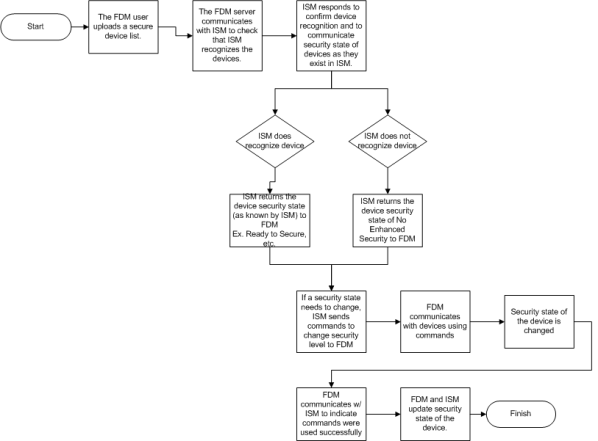
The security states that are updated during a security state change are displayed in the workbench. The Secure Devices workbench is split into two parts: the Details screen and the Properties screen. The Current Security State column of the Details screen outlines the current state of each device as known by FDM. The ISM Device Status, ISM Current Security Level, and ISM Pending Security Level items on the Properties screen outline the security state of the selected device as known by ISM since the last time it synced with FDM.
The possible security states for devices shown in the Current Security State column are as follows:
- Unknown. FDM has not yet communicated with ISM, so FDM does not know the security state of the device.
- Secure (Unverified by ISM). The device was imported into FDM via an Inventory import, and the inventory import sets an expected security state of Secure. Communications with ISM have not yet occurred, so the security state has not been verified by ISM (for work order customers only).
- Ready to Secure (Unverified by ISM). The device was imported into FDM via an Inventory import, and the inventory import sets an expected security state of Ready to Secure. Communications with ISM have not yet occurred, so the security state has not been verified by ISM (for work order customers only).
- No Enhanced Security. Communications with ISM have occurred, but ISM does not have the device (This is the default state of a device before a security level change occurs).
- Pending Secure. ISM has the device. The device state is in a Ready to Secure state in ISM and is waiting to be changed to Command Secure or Full Secure.
- Pending Ready to Secure. ISM has the device. The device state is in Command State or Full Secure state in ISM and is waiting to be changed to Ready to Secure.
- Ready to Secure. The ISM has the device, but the device does not yet have enhanced security (basic security only). FDM has the device listed and can communicate with the device even while it has basic security.
- Secure. ISM has the device. The device is in a Command Secure or Full Secure state.
The possible security states or levels for the devices known by ISM are as follows:
- Ready to Secure. No enhanced security is enabled, although it is available. Certain functions, such as remote disconnect/connect and reset demand, are not available when the security level is ready to secure.
- Command Secure. All commands between the endpoint and collection system are authenticated and encrypted with unique command keys. Command security is the minimum level of operation for devices offering service disconnect.
- Full Secure. In addition to the endpoint and collection command system settings, all readings from the endpoint are encrypted with a shared reading key. Itron Security Manager can use all keys that are available for the device. This is the most secure ISM mode.
- Undefined. The security level of the device is not set. This is the default security state listed for a device before its security state is changed to enhanced security.