Enable EFC
The Extended Field Communications (EFC) functions pertain to the following endpoints operating in network mode:
-
OpenWay Riva 500W ERT Module (encoder or pulser)
-
OpenWay Riva 500G ERT Module
-
OpenWay Riva Gas Disconnect (OWR-GD) endpoint
-
Intelis Gas Meter
-
Gen5 Intelis Gas Meter
-
Gen5 500G ERT Module
-
Gen5 500W ERT Module
Perform the Enable EFC command on an endpoint to put the endpoint into parent discovery mode, causing it to seek an EFC parent device.
If you perform the Enable EFC command on a device whose EFC status is already enabled, the device does not start to search for an EFC parent device. Instead it gives a success message and continues to operate as it was. If you perform Enable EFC on a device with a current BACT parent and which is functioning on the BACT network the device discontinues its existing BACT relationship but will also accept an EFC child device. Most multi-mode capable devices are shipped with EFC enabled.
You must have Program Endpoints permissions to perform the Enable EFC. The following diagram summarizes the procedure:
|
|
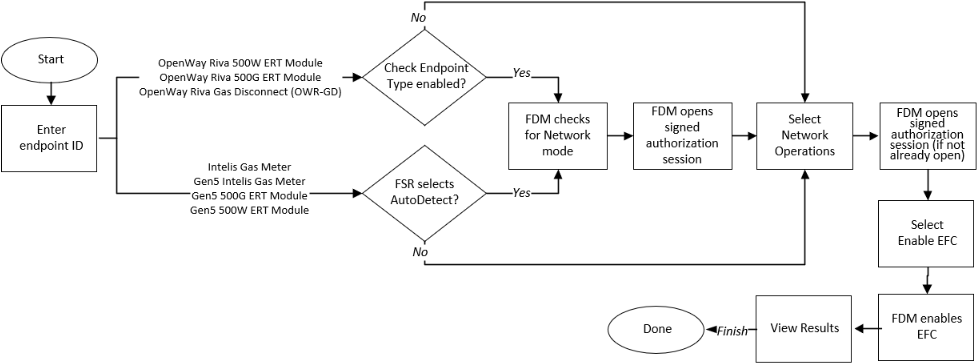
After you perform the Enable EFC command, perform the Check EFC Status command to confirm that Enable EFC was successful.