Force Registration
Use Force Registration to establish, on demand, C12.22 registration of an OpenWay CENTRON meter with the OpenWay Collection Engine (CE).
A meter must register before communications with the CE can begin. A newly installed meter normally registers with the CE automatically through the cell relay that provides the best connectivity with the CE. How long this takes depends on network conditions and CE parameter settings. The Force Registration command registers the meter right away.
If the CENTRON meter is configured for password security, you must enter a password before performing this function.
The following diagram summarizes the procedure.
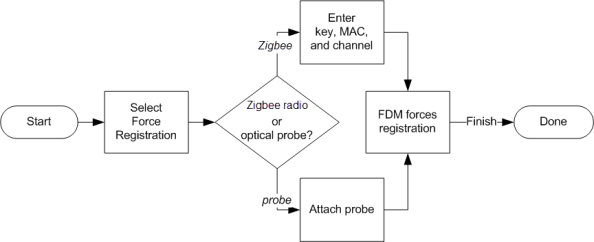
You must have a Zigbee radio or approved optical probe connected to your handheld or laptop to perform this and other OpenWay CENTRON meter action tasks. For installation details, see Bluetooth Device Setup on a Handheld, Bluetooth Device Setup on a Laptop, Connecting a radio to a computer's USB port, and Optical Probe Setup.