Check Endpoint
Use Check Endpoint to retrieve and view detailed values stored in a multi-mode capable device. When you select this option, FDM displays the Check Endpoint menu. The menu displays only those commands that are available for the selected endpoint type. All Check Endpoint commands require an open session.
The Check Endpoint Status, FWDL Status, and Check Firmware Versions commands are available to the following endpoints operating in Network mode:
- Gas devices:
OpenWay Riva 500G ERT Module
Itron Cellular 500G Module
- Gen5 500G ERT Module
- Intelis Gas Meter
- Gen5 Intelis Gas Meter
- Water devices:
- OpenWay Riva 500W ERT Module
- Itron Cellular 500W Module
Gen5 500W ERT Module
-
Telemetry devices:
- OWR-GRD
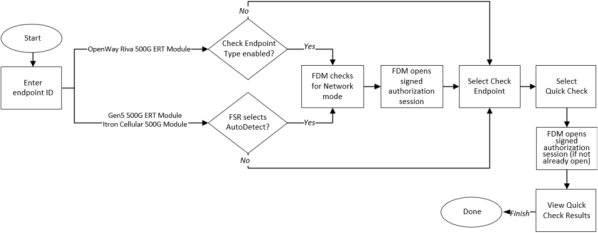
Quick Check is available for only the OpenWay Riva 500G Gas Module, Itron Cellular 500G Module, and Gen5 500G Gas Modules.
The menu options include:
Check Endpoint Status: All multi-mode capable devices support the Check Endpoint Status command. Check Endpoint Status returns details stored in the endpoint such as the meter configuration, service state, active events, and battery status.
The Intelis Gas Meter, Gen5 Intelis Gas Meter, Itron Cellular 500G and 500W Modules, OpenWay Riva 500W ERT Module, OpenWay Riva 500G, and Gen5 500W ERT Modules each return a Programmed Meter Configuration summary in the Check Endpoint Status results. Use the values in Programmed Meter Configuration to audit the work of the FSR who installed the endpoint. Evaluate the device's programmed values (such as the index dials, drive rate, and unit of measure) that are returned in the response fields to determine if they match what is currently observed at the meter. FDM's system administrator can view the meter's programmed configuration (as reported in Programmed Meter Configuration), as well as other results from Check Endpoint Status results. For more information, see the Field Deployment Manager Server Client Guide.
You must have Check Endpoints permissions to perform this command. For more information see the following Check Endpoint Response Fields section for the selected endpoint type.
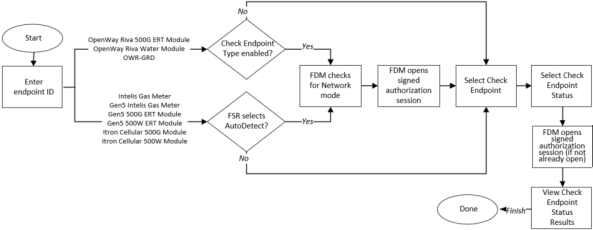
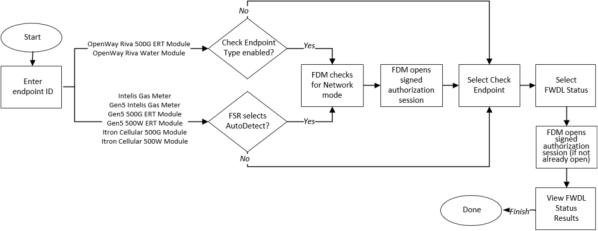
FWDL Status: Use the firmware download (FWDL) Status command to retrieve the current status report of an ongoing firmware image download. After starting a FWDL status check, FDM queries the meter or ERT module for a status and returns a summary of the firmware download status. The Firmware download status indicates whether or not there is an active firmware download. The summary refreshes every two minutes until the summary screen is closed.
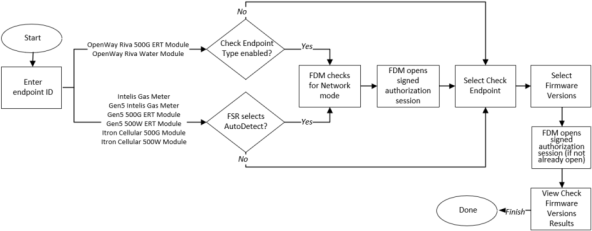
Check Firmware Versions: This command returns a list of the device's current running firmware and firmware versions.
Quick Check: Quick Check is supported by only the OpenWay Riva 500G, Itron Cellular 500G Module, and Gen5 500G ERT Module and depending on your utility's workflows, might or might not be available. Quick Check returns abbreviated check endpoint results for a quicker in-the-field experience. For more complete Check Endpoint results, use the Check Endpoint Status command.
An IMR connected to a PC/tablet is required to perform this function.
You must retrieve the necessary secure commands before you can execute this function (see Retrieving Secure Commands from the FDM Server). Your FDM security manager may have sent a key exchange command for the module along with the secure commands you retrieved from the server. If so, the mobile application executes the key exchange command before executing any of the secure commands. If you receive an error message indicating a security key mismatch, synchronize your mobile device with the server and then perform a Get Commands command. If you still receive the message after performing these steps, contact an Itron customer support representative.
Check Cellular Parameters: This feature is supported by the Itron Cellular 500G and 500W Modules.